A 7-Step Blueprint To Optimize Your Sales Process In 2026
These steps are ordered for a reason. Each one builds the foundation for the next. Skipping straight to automation before mapping the process is how many optimization projects fail.
Step 1: Audit Every Stage, Owner, And Tool In Your Current Process
You cannot optimize what you have not mapped. Start by documenting every stage from first touch to post-sale handoff. Write down who owns each stage, what system they use, what information is required, and where deals usually slow down. The goal is not to create a pretty flowchart. The goal is to create a friction map. Most B2B teams discover two or three stages with no clear owner. They also find stages where no one knows the exact exit criteria. That is where deals stall. Ask one simple diagnostic question:If a deal goes dark at stage 3, who notices first: and how long does it take? If the answer is unclear, your process has a visibility problem.
Step 2: Define Qualification Rules And Lead Routing Logic
Qualification should not depend only on a rep’s personal judgment. It needs clear rules.
Define your ideal customer profile. Set rules around company size, budget, urgency, industry, location, product fit, buying authority, and service requirements. Then build routing logic that automatically sends the right lead to the right person. A clean B2B pipeline depends on this step, because poor qualification can make the CRM look active while the real sales opportunity is weak. (building a B2B pipeline )
For simpler B2B sales, BANT may work well. For complex enterprise deals, MEDDIC or a hybrid framework may be stronger. The framework matters less than consistency.
Unrouted and misrouted leads are expensive. They waste rep time. They delay follow-up. They create a poor buyer experience before the first serious conversation even happens.
Step 3: Eliminate The Quote-To-Approval Bottleneck
For many B2B teams, the quoting stage is where deal velocity dies.
The buyer is interested. The rep has done the discovery call. The product fit is clear. Then the quote gets stuck. Manual quote building, offline spreadsheets, unclear discounts, pricing exceptions, and slow approvals can add days to the process. That delay creates risk. CPQ software helps by bringing together product configuration, pricing rules, discount logic, approval workflows, and quote generation into a single place. Guided selling helps reps select the right products, bundles, and options without guessing. This is why CPQ guided selling is useful for teams that deal with complex products, pricing rules, discount approvals, or custom configurations. (CPQ guided selling ) Pricing consistency is not just an admin issue. It protects the margin. It reduces approval chaos. It gives buyers more confidence. AI-powered CPQ can reduce quote turnaround time from several days to a much shorter cycle when product rules and pricing logic are properly configured.
Step 4: Automate Scheduling, Follow-Up, And Fallback Handling
Many deals do not die loudly. They go quiet.
The buyer says they are interested. The rep sends a follow-up. Then the days pass. No meeting is booked. No next step is confirmed. The deal slowly loses momentum.
This is where automation helps. Automated scheduling removes back-and-forth emails. Stage-based follow-up sequences keep deals moving. Fallback logic can alert the rep when a buyer has not replied, a meeting was not booked, or a deal has been in a stage too long.The goal is not to replace the rep. The goal is to remove routine tasks so the rep can focus on judgment, relationship, and negotiation.
Step 5: Standardize CRM Hygiene And Field Completion Rules
A sales process is only as reliable as the data inside it.
Set required fields at each stage. Do not wait until the last minute to collect important details. If service requirements, product configuration, billing terms, or decision criteria are missing late in the process, the handoff will suffer.
CRM hygiene also affects forecasting. If close dates, deal stages, next steps, and quote values are not updated correctly, leadership cannot trust the pipeline.
Clean data at close creates a clean handoff after close. That connection is often missed, but it matters. Sales data becomes service data. Service data becomes renewal data. Renewal data becomes long-term revenue.
Step 6: Set Stage-Level SLAs And Automated Performance Alerts
Optimization without measurement is just rearranging.
Each sales stage should have a clear service-level expectation. For example, no qualified lead should sit untouched for more than a set number of hours. No deal should remain in the proposal stage for more than five days without a next step. No approval should sit unanswered without an alert.Stage-level SLAs make process problems visible. Automated alerts make them actionable. This also helps managers coach better. Instead of reviewing every deal manually each morning, they can focus on where the process is breaking down.
Step 7: Build Operational Dashboards And Run Weekly Process Review Loops
The final step turns your optimized sales process into a system that keeps improving.
Build different dashboards for different users. Reps need next steps, overdue tasks, quote status, and deal movement. Sales ops needs stage conversion, SLA breaches, quote turnaround, and data completion. Leadership needs pipeline health, forecast accuracy, win rate, and revenue risk.
A pipeline review asks, “Which deals will close?”
A process review asks, “Where is the system slowing down deals?”
That second question is where real optimization happens.
Every weekly review should answer three questions:
Where are deals stalling this week?
Why are they stalling: process failure, data gap, or rep behavior?
What can we fix before Friday?
How To Choose The Right Tools To Support Your Optimized Sales Process
The 7-step blueprint can work with many platforms. But the right tool decides whether the process runs smoothly or requires constant manual effort.
A good sales process optimizer should fit your CRM, pricing model, approval structure, and post-sale workflow. It should reduce manual work without adding more complexity. The best tool is the one that fits the sales process your team already uses while removing the steps that slow deals down. (sales process optimization tools )
Team Profile | Primary Bottleneck | Tool Category Needed | What To Look For |
CRM-heavy B2B team | Quote turnaround time | CPQ platform | CRM-native setup, guided selling, approval automation |
Field service + sales team | Sales-to-service handoff | Quote-to-Service platform | Unified data across sales, dispatch, and service |
Enterprise with complex pricing | Pricing consistency | AI-powered CPQ | Rules engine, dynamic pricing, multi-currency support |
High-volume SMB sales team | Lead routing and follow-up | Sales automation + CRM | Routing logic, sequence automation, clean reporting |
For B2B teams running on Salesforce, HubSpot, Microsoft, Creatio, SugarCRM, or similar platforms, Mobileforce connects CPQ, guided selling, and field service management into a single Quote-to-Service flow. Its website positions the platform around CPQ, field service management, revenue operations, and CRM integrations across Salesforce, HubSpot, Microsoft, Creatio, SugarCRM, and others.
This kind of connected setup helps teams move from quote creation to approval and service delivery without losing key customer details.(Quote-to-Service platform )
That matters because many sales process problems happen between systems. Quoting happens in one place. Approvals happen in another. Service delivery happens somewhere else. When these systems do not communicate clearly with each other, the process breaks down.
A connected Quote-to-Service flow helps teams move from lead to quote to approval to service without losing context.
Platforms To Optimize Sales Process Efficiency: What To Check Before You Choose
Before choosing sales process optimization tools, look beyond feature lists. A tool may look strong in a demo, but it needs to work inside your daily sales process.
Check CRM Fit
The tool should work with your existing CRM, rather than forcing your team to rebuild everything from scratch. If your team lives in Salesforce, HubSpot, Microsoft, or Creatio, the optimization layer should support that environment.
Check Quote Complexity
If your pricing is simple, you may not need advanced CPQ. If your pricing includes bundles, discounts, region-based rules, renewals, add-ons, or approvals, CPQ becomes much more important.
Check Approval Logic
Approval workflows should be automatic, trackable, and visible. Reps shouldn’t need to chase managers via email or chat just to move a quote forward.
Check Field Service Handoff
If your sale leads to installation, delivery, dispatch, onboarding, or service work, the handoff matters. A closed deal should not create confusion for the operations team. This is especially important for teams where the sale leads to installation, dispatch, onboarding, or field service work. (field service handoff )
Check Reporting Quality
Dashboards should show where deals slow down, not just how many deals exist. Look for stage velocity, quote turnaround time, SLA breaches, win rate by lead source, and data completeness.
Check Ease Of Change
A good system should adapt as pricing, product rules, and sales motions change. If every small change needs a long IT project, the process will slow down again.
Turn Sales Complexity Into Your Competitive Advantage
Mobileforce’s no-code enterprise CPQ connects CRM data, product rules, pricing logic, and approval workflows into one quoting flow. It helps B2B teams reduce manual quote work, improve pricing consistency, and eliminate process gaps that slow deals. Explore AI-powered Quote-to-Service optimization for your CRM at Mobileforce.ai.
Conclusion
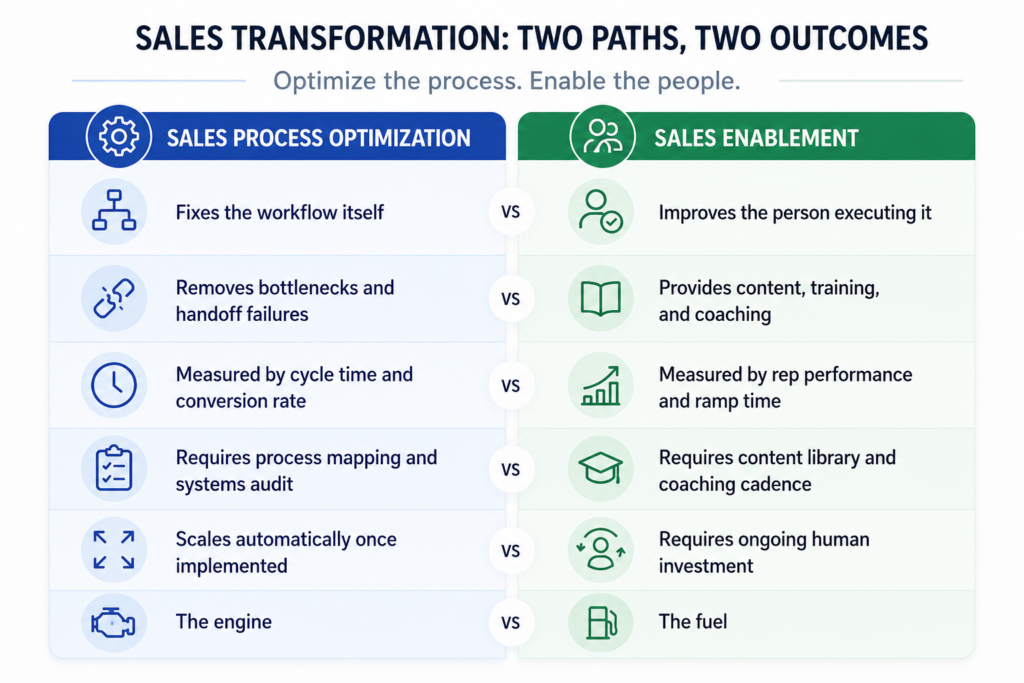
An unoptimized sales process is not a small internal issue. It is a compounding revenue leak. Every quote stuck in approval, every misrouted lead, every missing CRM field, and every broken post-sale handoff carries a cost. The B2B teams that closed faster in 2026 will not always be the ones with more reps. They will be the teams that stop accepting process friction as normal. The most important distinction is simple. Sales training improves the person. Sales process optimization improves the system, both matter. When that system connects pipeline, quoting, approvals, handoffs, and service, every team gets a clearer path from opportunity to revenue. (sales process optimization system )
But many companies invest heavily in training while ignoring the workflows that slow down every rep. That is why the 7-step blueprint works. It focuses on the process layer that training alone cannot fix. For B2B revenue teams using Salesforce, HubSpot, Microsoft, Creatio, or similar CRMs, Mobileforce provides an AI-powered Quote-to-Service platform that connects CPQ, sales, and field service management into a single, optimized revenue flow. It is built for teams that need faster quotes, cleaner handoffs, stronger CRM data, and a sales process that can keep up with modern B2B buying. Explore how AI-powered Quote-to-Service optimization works for your CRM → Mobileforce.ai.